.svg)
.png)


Key Takeaways
- Three habits help you get good at money in YNAB: assign money when it arrives, cover overspending as it happens, and reconcile regularly.
- YNAB takes a few minutes a day; about an hour of active effort each month.
- A plan in YNAB is an external system for money, the way a to-do list is for tasks—it lets you stop holding it all in your head.
This post was created in collaboration with Todoist—a popular digital task manager. Becky from Todoist (and also a fellow YNAB user) brings us the best tips and habits of successful YNABers, and shows us how to use those to get good at money, once and for all.
For most of my life, I avoided planning my spending because I didn’t want to think about money (or my lack thereof). When you’re living on student loans, money doesn’t even feel real. The numbers are so big, it’s hard to get your head around them. You might as well be playing Monopoly. What’s another $5 latte when you have $30,000 of loans and counting?
But money has a way of creeping into your thoughts no matter how diligently you try to ignore the subject. Will this debit card swipe overdraw my bank account? If I sign that year-long lease, will I be able to make the rent? If I put those Christmas presents on my credit card, will I have the money to pay it off? Can I afford to go out to that restaurant? Take that trip with friends? Will I be worrying about debt repayment for the rest of my life? Keep my lights on?
Spending money is a part of daily life, and can quickly grow into a constant source of stress.
Money stress was my normal state
In my early 20s, money created a vague, background anxiety to my life that became my normal. The more I tried to avoid thinking about it, the worse I felt about it. I still remember that physical sense of dread in the pit of my stomach at the thought of checking my account balances, which of course made me want to avoid checking them all the more.
Money was something I felt like I should have a handle on which made me feel even more guilty that I didn’t. I would make some half-hearted attempts at getting my finances in order in an Excel spreadsheet or using budget apps like Mint over the years. I’d steel myself to finally look at my accounts, update the numbers, and create a plan. I’d feel a momentary sense of relief, only to never look at the plan again. It wasn’t until my mid-twenties that I decided I was tired of being scared of my finances. That’s when I found YNAB, which was the tool that finally made it all click for me.
How can you stop worrying about money?
Today, I make a living writing about work and productivity for a task management app called Todoist. I spend a lot of time thinking about the invisible mental load each of us carries around all day every day. Your mental load is made up of all the things you worry about and feel responsible for—like getting an important task done at work, responding to that email from your boss, putting a home-cooked meal on the table, paying your rent, renewing your car insurance, dealing with unexpected expenses, returning your mom’s call…the list goes on and on.
All of those things require not just the time and energy it takes to do them, but the time and energy you spend thinking about doing them. Your attention is like a computer’s RAM. It can only hold so many things at a time before it becomes overwhelmed.
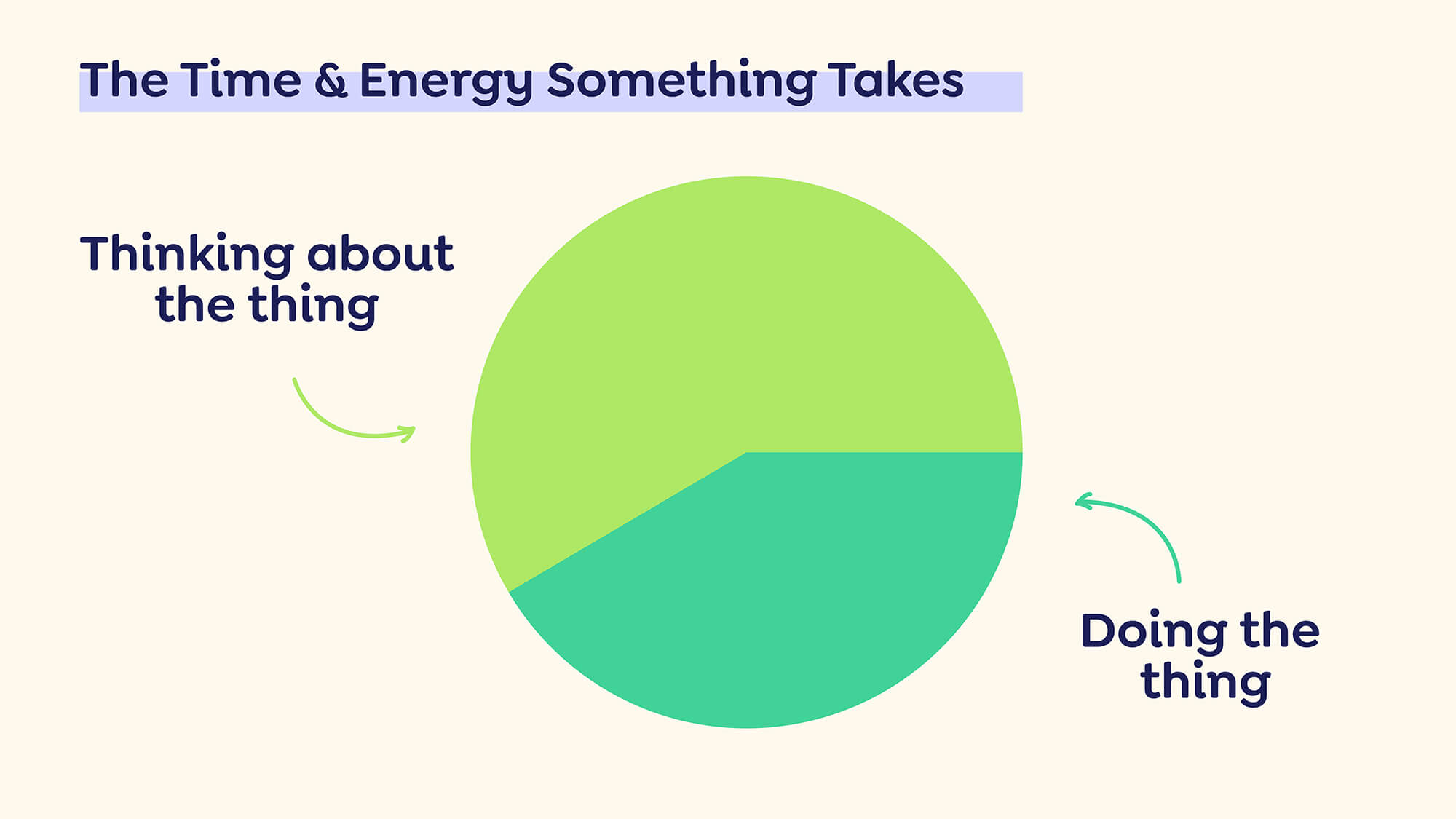
To make matters worse, our brains are hardwired to focus on scarcity. When you feel a vital resource is scarce—whether it’s food, time, or money—your mind fixates on it, which in turn makes you feel like you have even less of it. It’s a self-reinforcing cycle. The more scarce you feel money is, the harder it is to think about anything else.
I’ve come to think about my YNAB spending plan the same way I think about my to-do list—they’re both external systems for organizing things outside of my head so I can stop worrying about them. It’s a way to offload my RAM and free up mental space for what’s in front of me in the moment—whether that’s writing a blog post for work, spending time with my family, reading a book, cooking a meal, or anything else.
It’s counterintuitive, but since I’ve started using YNAB consistently, I think about money less, not more.
An easy YNAB routine: 3 habits to get good at money
Just like a to-do list, YNAB isn’t a set it and forget it kind of thing, but it’s easy once you get into the habit—and well worth it once you stop worrying about money. It also only takes about an hour of active effort each month. The best things in life require a little time, and with YNAB, it quite literally pays off.
I can teach you the best tips, but you have to find a way to implement those into your routine. How many times have we started over on a financial tool or downloaded a new task management app on January 1st only to let it drop a week later? You go right back to having vague worries in the back of your head about what you can and can’t afford and all the things you have to get done.
Learn more about how easy YNAB can be with a five-minute YNAB routine
For YNAB or a to-do list to reduce your mental load, it needs to become a long term habit. Luckily, it’s not complicated. Once you have YNAB set up, it really only takes three habits to maintain it, adding up to about an hour of active effort per month once you get the hang of it. Let me walk you through them.
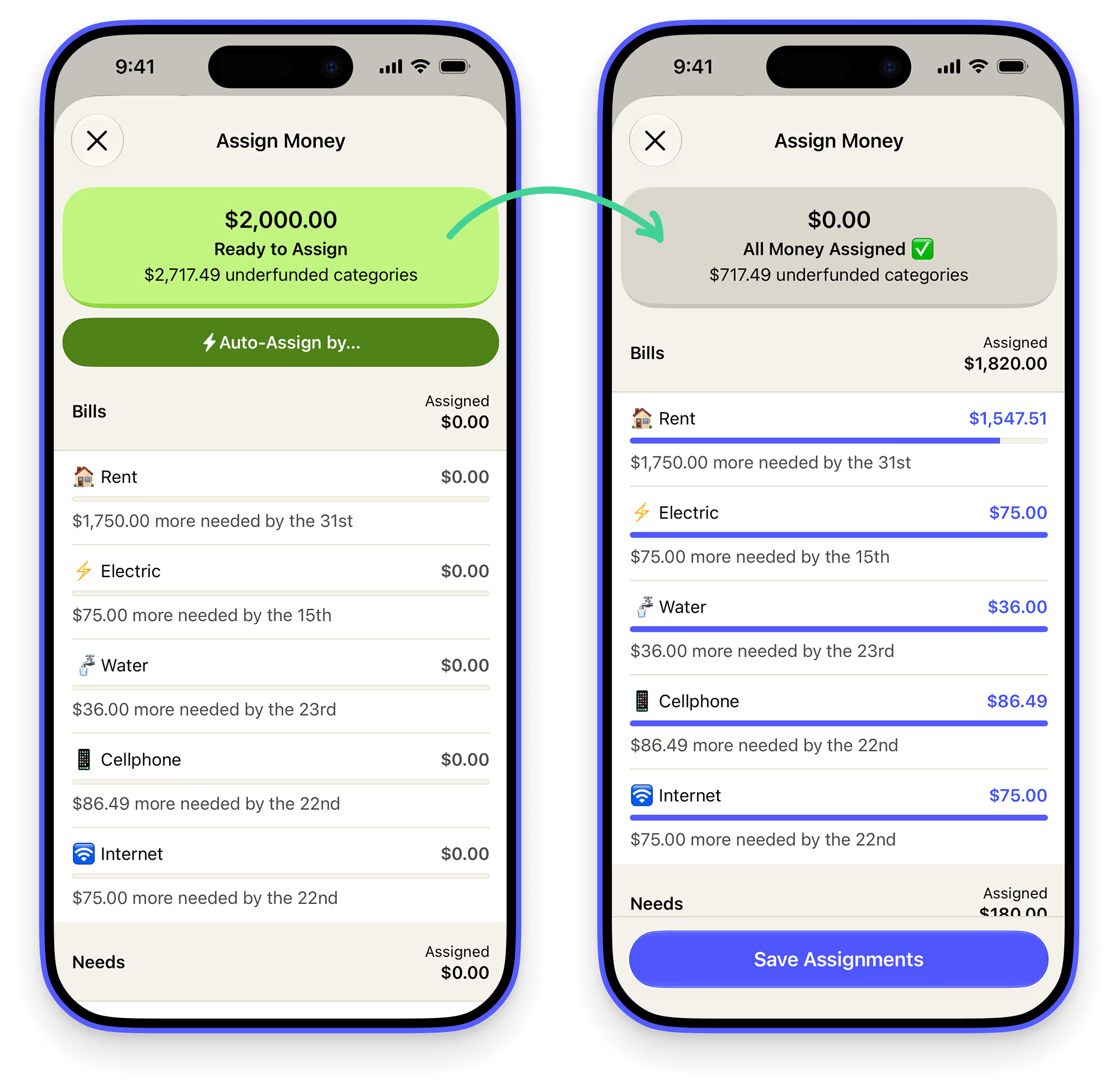
1. Assign your money as soon as it hits your account (15 min/month)
This is what YNAB’s method of asking “What’s this money for?” is all about! Every time you get a paycheck, assign that money to categories right away. This becomes easier over time because you can draw on your historical spending to know how much you’ve actually spent (vs. how much you wish you had spent 🙃).
I can quickly allocate all of my money on my phone using the auto-assign options for either my targets (for my savings categories) or my average money spent each month for ongoing monthly expenses like groceries, utilities, eating out, etc.
2. Track spending & cover overspending as it happens (1 min/day)
Just like you shouldn’t try to keep track of tasks in your head, don’t try to keep transactions in your head. I enter most spending myself as it happens, especially for Venmo transfers since the transaction only appears as “Venmo” without any payee info.
As a backup, I also have YNAB connected to my bank accounts and Apple Wallet to automatically pull in any transactions I may have missed. It matches with any transactions entered manually so there aren’t any double entries. It also pulls in automatic payments I have set up like my utility bills, mortgage payment, software subscriptions, etc.
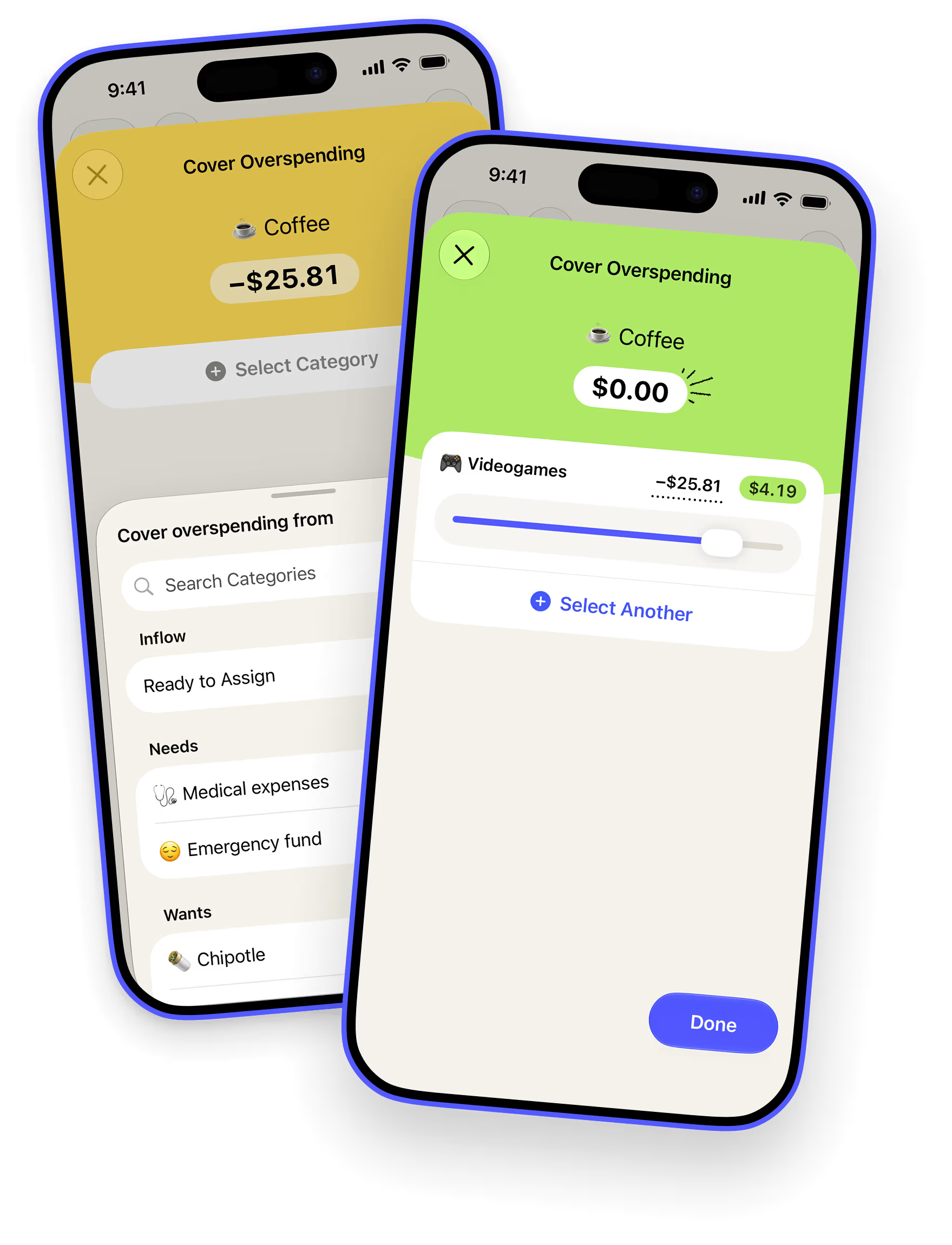
I approve any new transactions every morning over a cup of coffee. The app makes it really easy to cover overspending as it happens so I can easily move money between categories to adjust my plan (YNAB really values flexibility). It takes about a minute and I know exactly where all of my spending categories stand. It helps me practice mindful spending that’s aligned with my priorities—day in and day out.
3. Reconcile regularly (15 min/month)
Reconciliation is key to make sure the system matches up with reality so you can trust that you actually have the money YNAB says you have. I reconcile my accounts when I get paid, usually right before I give those new dollars a job (if you’re just getting started, YNAB recommends reconciling your accounts at least weekly).
Check out our interactive guide on How to Reconcile in YNAB
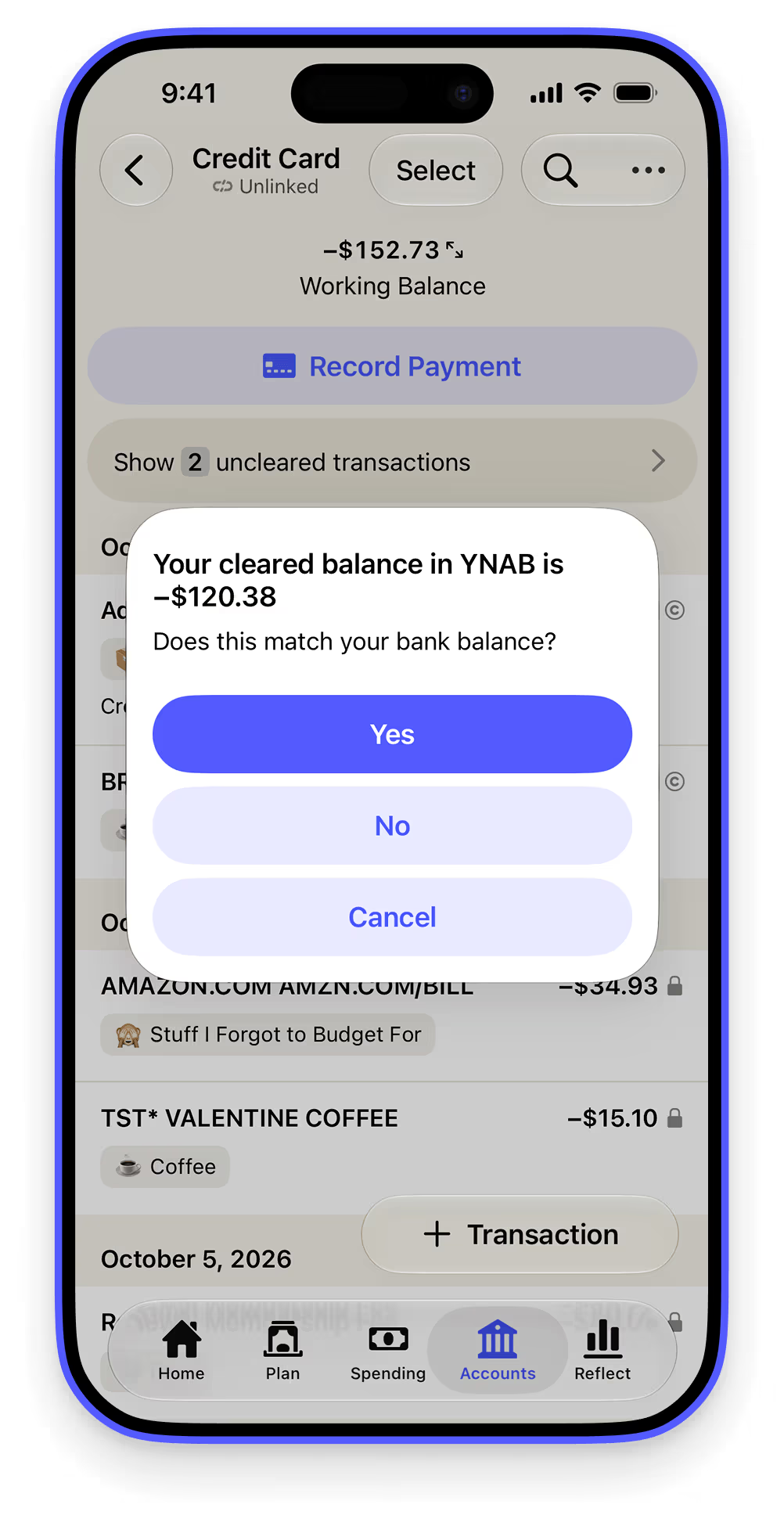
I open the YNAB web app on my laptop and log in to each of my accounts (one checking, two credit cards) on my phone to look up the balances and make sure they match with what YNAB says. I keep my savings account and investment accounts separate from YNAB so I can just let money accumulate there without thinking about it—it’s not in YNAB, so I can’t spend it.
Because I use as little cash as possible and have YNAB automatically pull in any transactions that I may have missed entering manually, reconciling usually takes no time at all. 15 minutes would be a worse-case scenario when the balance numbers don’t match, and I have to go into my transaction history for the last month to see what I missed. It’s usually because I manually recorded a transaction from the wrong account.
That’s it. Those are the three habits you need to master to turn vague money anxieties into confidence that all your spending is accounted for.
9 tips to make your YNAB habits stick
Of course, when you’ve spent your entire life avoiding your finances, starting and sticking to those three YNAB habits is easier said than done. Here are some of the best tips I’ve found that have gotten me to the point where YNABing is something I do automatically without giving it too much thought:
1. Download YNAB on your phone.
It makes it easier to pull up your plan and approve transactions anywhere. The easier you can make a habit the easier it’ll be to make it stick.
2. Use your thumb’s muscle memory to your advantage.
What’s the first app you automatically open every time you open your phone? Replace that app icon on your home screen with YNAB.
3. Keep the red notification dot turned on.
Enable notifications so that it shows up on the YNAB icon when you have transactions to approve or overspending to cover. Whether it’s your email, Instagram, or YNAB, that red dot triggers a reflex to get rid of it. YNAB is one app you want to be addicted to.

4. Piggyback off of an existing habit.
Research shows that the easiest way to build a habit is to trigger it with a habit you already do every day automatically. For me, I check my money plan, approve transactions, and cover overspending while drinking my morning coffee. Because there’s no way I’ll ever skip my morning cup of joe.
5. Make a plan for when and where you’ll do your YNAB upkeep.
Write it down. Put it on your calendar. If you use a digital task manager, add it as a task with an automatic reminder. Studies show that making a specific plan for when and where you’ll do something—from exercise, to voting, to getting a colonoscopy—makes it more likely that you’ll actually follow through. And from what I hear, using YNAB is far more pleasant than a colonoscopy.
Check out our live hangouts where we YNAB online together!
6. Pair checking YNAB with an activity you already enjoy.
Maybe you reconcile your accounts while eating a treat you love, watching a show you’re addicted to, or nestled in your favorite window nook with your favorite beverage. Psychologists call this temptation bundling and it’s a powerful way to build any habit.
7. Build a streak for each day you get to “YNAB Zero” (no outstanding transactions or overspent categories).
This is Jerry Seinfeld’s Don’t Break The Chain method of habit-building. Mark each day you successfully hit YNAB Zero on a calendar. Put up the calendar somewhere you’ll see it every day. The longer your streak becomes, the more motivated you’ll be not to break it.
8. Use YNAB’s quick shortcuts.
Auto-Assign and Average Spent make it fast to give every dollar a job—even on your phone—and help keep you honest about how much you really spend in each category. The more realistic your plan is, the easier it will be to stick to.
.avif)
9. Cover overspending right away.
In the past, overspending was always my downfall. What’s the point of making a spending plan if I can’t stick to it anyway? YNAB made me realize I can’t see into the future and I shouldn’t expect myself to. A plan that can’t bend will break. YNAB’s mobile app makes it easy to identify overspending and move money from another category to cover it. Overspending might feel like a failure at the start. Instead of avoiding that discomfort, face it head on. I’m four years into consistent YNABing and I still overspend categories all the time, but now I know it’s just a natural part of the process.

How do I catch up if I’ve fallen behind in YNAB?
One last tip to end on: forgive yourself for the past money mistakes you’ve made. We all carry past financial baggage with us. Money gets all mixed up with our sense of self-worth and guilt and shame in complicated ways. But here’s the thing: any mistakes you’ve made in the past are a sunk cost—you can’t do anything about them. Don’t let any guilt or shame you may feel about the past keep you from making the next right decision. Give yourself permission to wipe the slate clean.
Ready to put these YNAB habits to good use and take back mental real estate from your money? Todoist partnered up with YNAB to create an Organize Your Finances template. The project template will walk you through all the steps to get your budget set up, pay off debt, and work towards your savings goals. It also includes all the daily, weekly, and monthly recurring tasks you need to make your YNAB habits stick.
.avif)
Becky is a writer and editor at Doist. She keeps her life in order with a lot of help from Todoist and YNAB.


.avif)
