.svg)
.png)
.avif)


How to Manage a Credit Card (Any Credit Card!) in YNAB
.avif)


Key Takeaways
- Game changer: Think of credit cards as payment methods, not extra money.
- YNAB moves dollars automatically from spending categories to cover new credit card spending.
- Credit card payments are always set as a transfer to make life easier.
You might think that using a credit card and following your spending plan are mutually exclusive endeavors. You’re either charging stuff, or you’re following your plan, right? Wrong. It’s totally possible to use your credit card within the parameters of your plan—a confusing possibility if you’ve never considered it before.
And, that’s how YNAB is designed. We want to help you avoid burying yourself in debt, and that makes credit card handling in YNAB unique.
If you’re ready to be (or remain) debt-free, keep reading for an explanation of how to use your card (for rewards, perhaps?) without going into debt, plus how to enter credit card transactions, payments, interest and fees into YNAB. Here we go!
Spending decisions are made in YNAB based on your plan
The most important thing to remember, before we dive into the technical intricacies of credit cards, is that your big life vision runs the show. When you followed the YNAB Method, giving every dollar a job, you didn’t do it willy-nilly. No way! You decided which categories to create and where to allocate your dollars based on that vision.
In other words, your plan (and the priorities represented within) is custom-made to support your necessities, values, and aspirations. Whenever you make a spending decision, refer back to your plan (a.k.a., your categories). Your plan is your North Star.
Why credit cards in YNAB are treated as payment methods
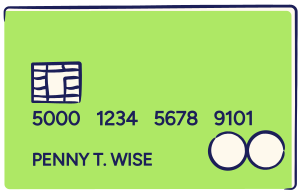
Your credit card is simply a payment method—nothing more, nothing less.
When you use it, you create debt, whether it’s $33.00 for a sweet, new piece of vinyl or $4.22 for three, over-priced, hard-boiled eggs at your gym’s on-site cafe. If you charge it, you owe the credit card company for it.
The very important thing is that you reserve some of your cash to pay off that debt, and that is what your YNAB plan is set up to help you do.
How to enter credit card transactions in YNAB
First, add a credit card to your plan. When you do, YNAB automatically creates a category group called “Credit Card Payments,” and it looks like this:

So, let’s say you decide to purchase the record and the hard boiled eggs, mentioned above. Before making your purchases, check what you have available to spend:

You’ve got more than enough dollars in your “Fun Money” category for the $33 record, and you’ve got enough dollars in your “Dining Out” category to cover the $4.22 eggs. Great!
After you’ve paid, it’s time to enter your transactions under the credit card account screen. To do this, assign your purchases to the categories where you’ve set aside money for them—your “Fun Money” and “Dining Out” categories. Your credit card account register in YNAB will look like this:
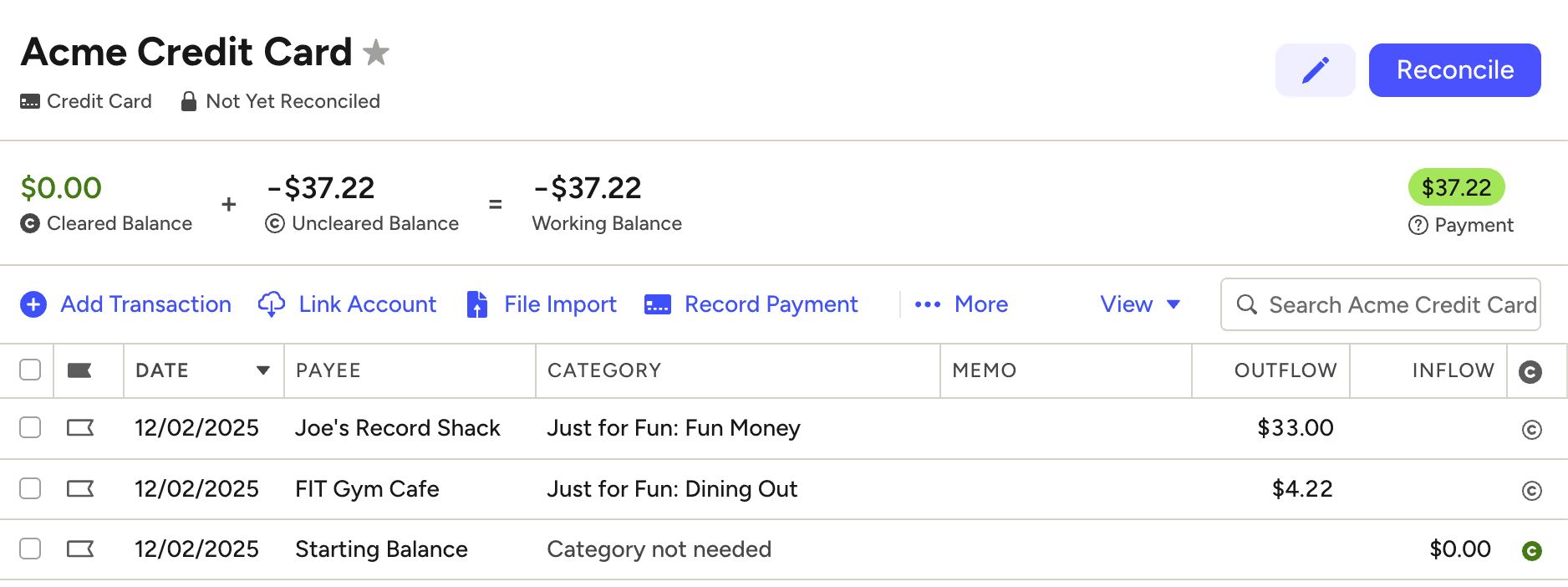
Now, your Acme credit card balance is $37.22, which is reflected in YNAB.
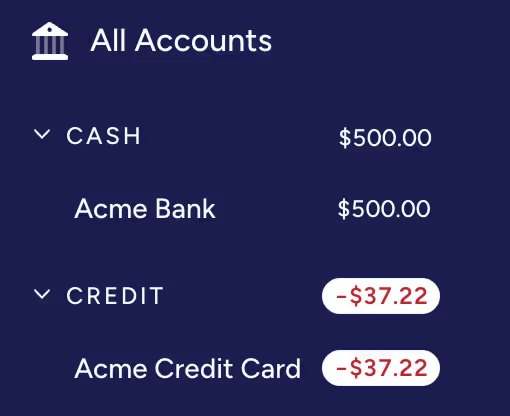
Now, here’s the cool part. When you added your new transactions to the credit card account, YNAB automatically moves the dollars in your categories:
- $33.00 are moved from your “Fun Money” category to the “Acme Credit Card” category, and
- $4.22 is moved from your “Dining Out” category to the “Acme Credit Card” category.
Now, when you click over to view your budget, you’ll see the sum of your purchases (a total of $37.22) available in your Acme credit card category:

The $37.22 is no longer available for fun or eating out. It’s got a new job—to keep you out of debt by paying off your Acme card! And, your “Fun Money” and “Dining Out” category have been automatically updated, too:

When it’s time to pay your Acme credit card bill, you’ve got the funds ready to go!
How to record credit card payments in YNAB
After you pay the credit card company, you need to record your payment. To do this, click over to your credit card account screen. On the top, right-hand side of the screen, you’ll see the dollars you have available to pay in green. In this case, $37.22:
Click “Record Payment,” in the second row of the screen (towards the middle), and then click “Save.”
YNAB updates both your checking account and credit card account screens. Here, you can see that your payment has been credited to your Acme credit card:
.avif)
And, here, you can see that your checking account has been debited:
.avif)
Congratulations, you’re debt-free, once again, and everything is current in YNAB.
Note: Another way to make credit card payments is by entering a transaction under your bank account in YNAB (just like you would for any other purchase). Click “Add Transaction,” select the date of your payment, and make a payment to “Acme Credit Card” in the amount of $37.22. Same result as above.
How to pay off existing credit card balances
Does the example, above, feel a bit, erm, idealistic to you? Perhaps, like so many of us, you're worried about a credit card balance the size of Montana hanging over your head? I mean, that’s why you’re even YNABing, in the first place, right?
Welcome, stranger, and fear not—you're not alone! Firstly, if you’ve got multiple debts, consider snowballing them. And, here’s how you record your credit card payments in YNAB …
Simply allocate dollars for your payment underneath the “Credit Card Payments” category (the same way that you allocate dollars to any other category). This amount will display in green in the “Payment” column of your budget. If you budget $50, and it will look like this:

Now, let’s say that you didn’t pay off the $37.22 (for the record and eggs). In addition, you want to send $50 towards your existing balance (way to pay off that debt!). In this scenario, the $37.22 would work just as it did before, and the $50 would simply be added to your payment amount for a total of $87.22 available in the payment column of your Acme credit card category—$37.22 coming from your “Fun Money” and “Eating Out” categories, and $50 coming from your available “Ready to Assign” money. Progress!
How to handle credit card interest and fees
If you’re carrying a balance, here’s how to account for the interest and fees that your credit card company will charge:
Wherever it makes the most sense to you, create a category in your plan to hold your interest and fees if you don’t already have one:

When you get paid, allocate dollars to this category to save up in advance to pay off the interest and fees. If you don’t know how much it will be, use a generous guesstimate. Then, when you’re charged interest/fees, record the transactions in your credit card account register (just like you would for any other purchase).
Just like with the record or eggs from our example, when you record the transaction, YNAB will move the money out of your “Interest & Fees” category to your credit card category. That’s it!
Where to get more help with credit card handling in YNAB
If you have a question that wasn’t covered in this blog post, check out the helpful credit card section of our support documentation.
And, if you’d like a deeper dive into managing your credit card debt, drop into one of our free workshops to get personalized support from an expert YNAB teacher on handling credit cards.
Do you ever worry about money? You're not alone. Download YNAB, get good with money, and never worry about money again. Try YNAB for free for 34 days.
FAQs
1. How does YNAB keep credit card purchases from turning into debt?
YNAB moves the dollars you assigned in your spending categories directly into your credit card payment category so you’re ready to pay the balance.
2. How do I record a credit card purchase in YNAB?
Enter the transaction in your credit card account and assign it to the category where you assigned money (like Fun Money or Dining Out).
3. How do I track interest and credit card fees in YNAB?
Create an Interest & Fees category, set money aside for them, and record interest or fees as transactions—YNAB will move dollars automatically.
4. What if I already have a credit card balance?
Assign whatever amount you plan to pay under the Credit Card Payments category. YNAB will display the payment amount in green in your payment column.


.avif)

